
What the job is
An IT support specialist keeps people and their equipment working.
- You set up laptops and accounts, fix access problems, answer tickets and explain the fix in plain words.
- When a problem is bigger than one user, you collect the details and pass it to the right team.
Two kinds of support jobs
There are two kinds of support jobs under this name, and they are quite different.
Internal IT support
Internal IT support serves a company's own staff. You manage laptops, phones, printers, user accounts, email and meeting rooms. The customer is a coworker.
Technical or product support
Technical or product support serves a company's customers. You troubleshoot the company's own software or hardware, reproduce bugs and write them up for engineers. The customer is an outside user, often another business.
Job titles to search
Both appear on our board under the same role. Search for all of these titles:
- IT Support Specialist, IT Support Technician, IT Technician
- Help Desk Technician, Service Desk Technician, Desktop Support
- Technical Support Specialist, Technical Support Engineer
- Customer Support Engineer, Product Support Engineer, Support Engineer
The IT Support Specialist market now
Work format
- On-site 73%
- Hybrid 14%
- Remote 13%
Openings by level
Where the jobs are



Read the market before you apply
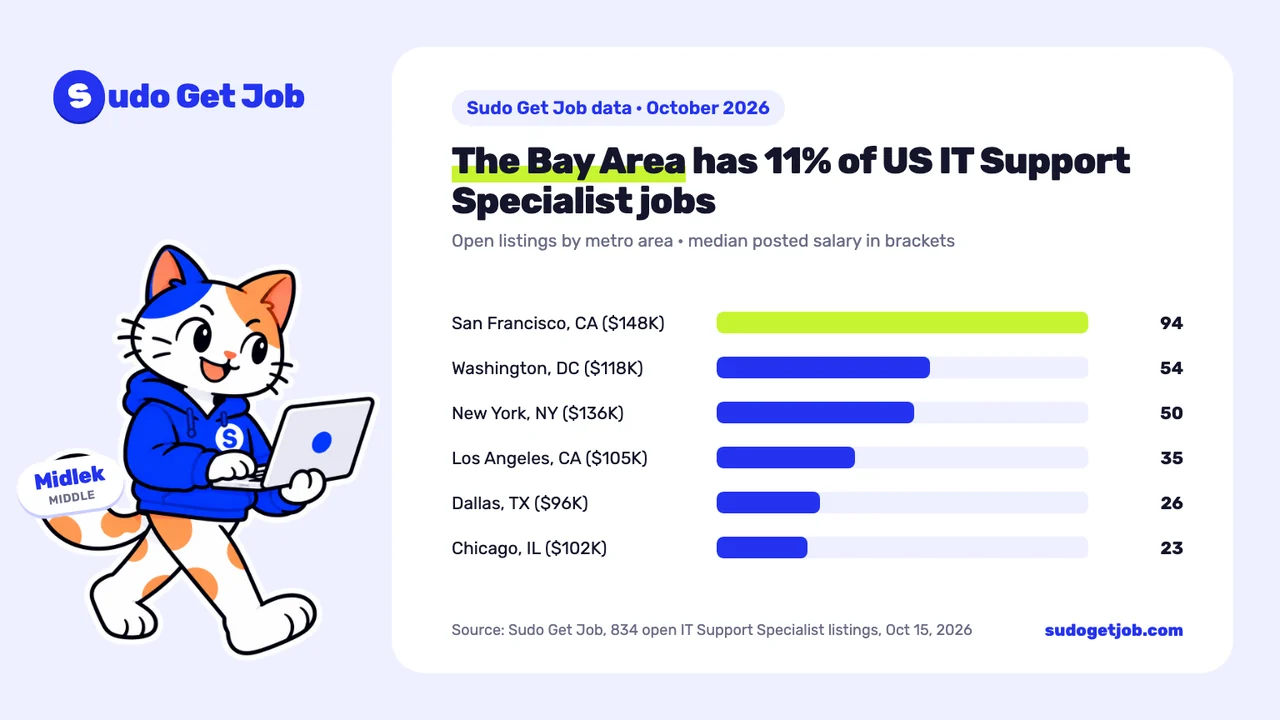
The panel above shows open IT Support listings right now. Use it to plan your search.
Cities
Support roles exist wherever people work in offices, labs and plants. That is why this role is spread across more metros than most engineering roles. Look at the city table and check the metros you can actually reach.
Format
Most IT support work is on-site or hybrid. Someone has to hand out laptops, fix a conference room and replace hardware. The remote share in the panel is mostly product support roles, where the work happens through tickets and calls.
Employers
The hiring table often includes federal contractors and manufacturers. When we checked our listings in October 2026, about one in five IT support postings mentioned a security clearance. Those jobs often require US citizenship. Read the requirements before you apply.
Pay
The median and the middle 50% come from salary ranges that employers posted. The IT Support salary page shows the same numbers by level and city.
Skills employers screen for
Postings list many tools. The core of the job is a smaller set of skills.
Troubleshooting
This is the main skill. Interviewers want to see that you work in order:
- 1
Ask what changed
- 2
Reproduce the problem
- 3
Check the simple causes first
- 4
Change one thing at a time
- 5
Confirm the fix with the user
Operating systems
You need to be comfortable with Windows and at least familiar with macOS. Many companies give staff a choice of laptop. Know how to install software, manage updates, check disk and memory, and read basic system logs.
Accounts and identity
A large part of the work is access: new hires, password resets, locked accounts, group membership, people leaving the company.
Microsoft
Learn Active Directory and the admin side of Microsoft 365.
Other tools
Many companies also use Google Workspace or a single sign-on tool like Okta.
Device management
Companies manage laptops and phones from a central console.
Learn:
- How a new laptop is enrolled
- How a policy is pushed
- How a lost device is wiped
Networking basics
Many tickets are network tickets in disguise.
- Know what DNS does
- How DHCP hands out addresses
- What a VPN is for
- How to test a connection step by step
The TCP/IP basics are enough at this level.
Ticketing and process
Support teams run on tickets. ServiceNow and Jira are the tools you will see most often. ITIL is the common vocabulary for incidents, requests, problems and changes.
Scripting
Small scripts save hours.
Windows
PowerShell is the usual choice on Windows.
A script that creates user accounts from a list or collects system information is a good first project.
Communication
Users are often stressed when they call support. Stay calm, use plain words and tell them what happens next.
Certifications
Certifications matter more in IT support than in most tech roles. They give a hiring manager a quick check when you have little work history.
- 1
CompTIA A+
The CompTIA certifications are the ones named most often in our IT support listings. CompTIA A+ is the usual entry certification.
- 2
Network+ and Security+
Network+ and Security+ are common next steps.
Government and contractor roles
Some government and contractor roles require a specific certification for the job, so read those postings closely.
Vendor certifications
Vendor certifications from Microsoft, Google, Apple or Jamf help when the posting names that vendor.
ITIL Foundation
An ITIL Foundation certificate helps at larger companies with formal service desks.
Build proof of skill
If you have no IT job yet, build a small lab and document it.
- 1
Set up a home lab
Use an old PC or free virtual machines. Install a Windows Server trial, create a domain, join a client to it and create users and groups. Break things on purpose and fix them.
- 2
Write it up
For each lab, write a short page: what you built, what went wrong and how you fixed it. Put the pages on GitHub or a simple personal site. This shows how you will write ticket notes and documentation.
- 3
Support real people
Volunteer IT work for a school, a church, a nonprofit or a small business counts as experience. So does being the person your family calls when the Wi-Fi is down, if you can describe specific problems you solved.
- 4
Write a script
Automate one boring task, such as a report of disk space on several machines. A working script with a clear README is strong proof for a support role.
Write a resume that survives screening
Your resume is read by parsing software and then by a recruiter. Write for both.
Keep the format plain
One column, standard headings, a common font. No tables, graphics or text in images.
Show volume and scope
Support work is easy to describe with numbers you actually know: how many users you supported, how many devices, which systems. "Supported 150 staff across two offices on Windows and macOS" says a lot in one line.
Show the fix, not just the task
"Reset passwords" is a task. "Cut repeat lockout tickets by setting up self-service password reset" is a result. If you have no metric, describe the effect plainly.
Match the posting's words
If the job asks for Intune, Active Directory and ServiceNow, use those exact names where they are true for you.
List certifications near the top
Recruiters scan for them. Include the ones you are studying for, marked as in progress.
Transfer customer service experience
Retail, call center, hospitality and teaching jobs all build the patience and clear speech that support needs. Keep one or two bullets about them.
Where to apply
- Apply on the employer's site, and early Every job on our board links to the employer's own application page. Sort by newest and filter for jobs posted in the last 7 days. Our report on how old open tech job posts are shows why freshness matters.
- Look at employers outside tech Hospitals, universities, school districts, manufacturers, law firms and local government all need IT support. Competition for these roles is often lower than at well-known tech companies.
- Consider contract and managed service roles Managed service providers support many small businesses at once. The pace is fast and you see many different systems. It is a common first job and a good place to learn.
- Check clearance requirements early If you are a US citizen and can pass a background check, cleared roles at contractors are worth a look. Some employers sponsor the clearance for the right candidate. The posting will say so.
How the interview process works
Support interviews are shorter than engineering loops. Most have three parts.
Recruiter screen
A short call about your background, schedule, location and pay. Support roles may include shifts, weekends or on-call. Ask about this early.
Technical interview
Usually scenario questions. Expect questions like these:
- A user cannot connect to Wi-Fi. What do you check, in what order?
- A new hire starts Monday. What has to be ready?
- A user says the internet is slow. How do you find out if it is their machine, the network or the website?
- Someone reports a suspicious email. What do you do?
Some companies add a hands-on test in a virtual machine.
Behavioral and manager interview
Expect questions about a difficult user, a mistake you made and a time you did not know the answer. Prepare a few short stories. Use the situation, task, action, result structure. Show that you stayed calm, kept the user informed and learned something.
After the interview
Send a short thank-you note. If you are rejected, ask what would make you a stronger candidate next time.
Salary and negotiation
Know what the ranges mean
Several US states, including California, Colorado, Washington and New York, require pay ranges in job postings. The range is base pay. Some support jobs are hourly. Check which one the posting uses.
Set your number from data
Use the IT Support salary page to see the median and middle 50% for your level and city. The panel above shows it by metro.
Ask about more than pay
Shift differentials, on-call pay, training budget and certification reimbursement all matter in support. A paid exam and study time can be worth a lot in your first year.
Entry-level and career-switch paths
Where internal IT support leads
Plan your first year with the next step in mind. Common moves from support are:
Systems administrator
Systems administrator, if you like servers, identity and automation. See our Systems Administrator guide.
Network engineer
Network engineer, if you like routing, switching and firewalls.
Cybersecurity analyst
Cybersecurity analyst, if you like incidents and investigations. See our Cybersecurity Analyst guide.
Cloud engineer
Cloud engineer, if you like infrastructure in AWS or Azure.
Where product support leads
Product support leads in other directions: QA engineer, solutions engineering or software engineering.
Finding a remote role
Remote IT support jobs exist, but they are a small part of the market. See all remote IT Support jobs and the remote salary data.
Our report on where remote tech jobs are shows how support compares with other roles.
Most remote support roles are product support. They want:
- Clear writing
- Comfort with screen sharing and remote tools
- The ability to work across time zones
A short checklist
- Decide between internal IT support and product support.
- Pick the cities you can reach, since most support work is on-site or hybrid.
- Set a salary range from the median for your level and city.
- Earn one entry certification, such as CompTIA A+.
- Build a home lab and write up what you did.
- Rewrite your resume around users supported, systems and results.
- Apply early on employers' own sites, including employers outside tech.
- Practice troubleshooting scenarios out loud.
- Prepare stories about difficult users and mistakes.
- Ask about shifts, on-call and training budget before you accept.
Start with the current IT Support jobs, newest first.